
PaperScan Scanner Software Home Edition3 - Download
You'll be able to download in few seconds.
Publisher Description
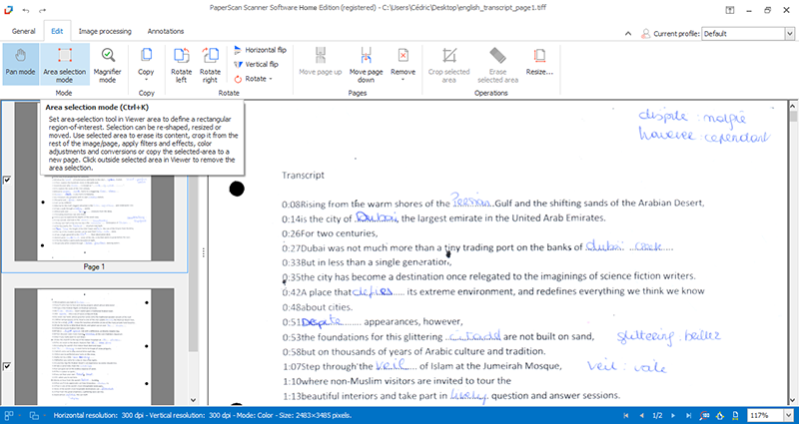
PaperScan is a universal scanning software designed to offer power as well as simplicity of use.
The Home Edition of PaperScan was optimized to conveniently provide powerful yet 'must-have' features at a really affordable price.
While most scanning applications are dedicated to one scanner or one scanning protocol, PaperScan Home Edition allows you to control any scanner, including network scanners (TWAIN or WIA protocols), cameras or acquisition cards. All features are automatically negotiated and handled by PaperScan Home Edition.
PaperScan Home Edition provides flatbed and document feeder support.
Already existing images or PDF files can be imported with PaperScan in order to adjust and enhance their quality with the following functionalities:
-angle rotation
-black and white, grayscale or colour conversion
-colour adjustment (brightness, contrast, saturation, gamma)
-filters to smooth, stretch contrast or median the image
-bitonal filters to remove isolated dots or to dilate/erode characters
-contour, sepia or scanline effects.
For PDF files, PaperScan Home Edition offers read-write encryption support.
PaperScan Home Edition includes image post-processing options such as: quality selection, area selection, image cropping and resizing, image printing and more.
PaperScan displays information on the resolution, size and colour mode of an image.
Acquired or imported files can be easily handled to create multipage or single-page document files.
You can save files in various formats such as PDF, PDF/A, PDF with encryption, TIFF , JPEG, PNG and even JBIG2.
Based on your Windows language settings, PaperScan automatically displays the localized version of the interface, if it exists among PaperScan translated interface versions. Currently, available languages are English and French.
PaperScan is based on GdPicture document imaging technologies.
About PaperScan Scanner Software Home Edition
This Office Suites & Tools program is available in English, French. It was last updated on 29 September, 2026. PaperScan Scanner Software Home Edition is compatible with the following operating systems: Windows.
The company that develops PaperScan Scanner Software Home Edition is ORPALIS. The latest version released by its developer is 3.
The download we have available for PaperScan Scanner Software Home Edition has a file size of 35.7 MB. Just click the green Download button above to start the downloading process. The program is listed on our website since 2018-05-29 and was downloaded 0 times. We have already checked if the download link is safe, however for your own protection we recommend that you scan the downloaded software with your antivirus. Your antivirus may detect the PaperScan Scanner Software Home Edition as malware if the download link is broken.
How to install PaperScan Scanner Software Home Edition on your Windows device:
- Click on the Download button on our website. This will start the download from the website of the developer.
- Once the PaperScan Scanner Software Home Edition is downloaded click on it to start the setup process (assuming you are on a desktop computer).
- When the installation is finished you should be able to see and run the program.
Program Details
System requirements
Download information
Pricing
Version History
version 3
posted on 2018-05-29
30+ languages supported/
Save as PDF-60+OCR languages/
Batch acquisition: Auto Rotation/ Auto deskew/ Remove punch holes and borders, Blank pages detection/
Automatic color detection/ JBIG2 & MRC compression/ New PDF conformance levels and versions as output format: PDF/A-1,PDF/A-2,PDF/A-3(a,b,u)
version 3.0.21
posted on 2016-06-09
New User Interface.
More than 20 new filters and effects.
Support for SVG, EMF and WMF.
New advanced printing dialog to specify alignment, adjustment, orientation...
New profile manager to create, remove and switch configuration settings.
New preview feature in scanning wizard.
And much more
version 1.3.6
posted on 2011-10-13
JPEG-2000 support, PDF encryption. Autodeskew and other Document Imaging Filters improvement, speed improvement.
Disclaimer
External Download
We do not host PaperScan Scanner Software Home Edition on our servers. We did not scan it for viruses, adware, spyware or other type of malware. This app is hosted by the software publisher and passed their terms and conditions to be listed there. We recommend caution when installing it.
The external download link for PaperScan Scanner Software Home Edition is provided to you by apps112.com without any warranties, representations or guarantees of any kind, so access it at your own risk.
If you have questions regarding this particular app contact the publisher directly. For questions about the functionalities of apps112.com contact us.
